基本驱动模型
openvela驱动模型
在openvela的APP眼中,一切都是“文件”:包括硬件、常规文件,都是使用“open/read/write/ioctl”等接口来访问。
APP和驱动之间的简单对应关系如下:
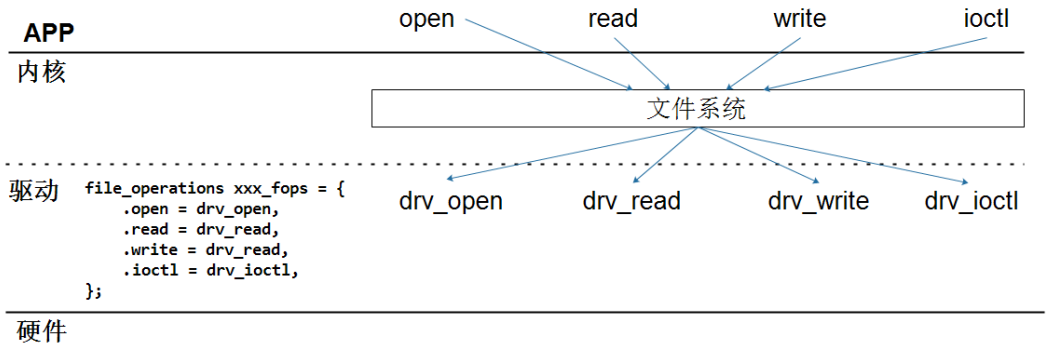
APP调用open函数时,内核会根据文件名找到驱动程序的“struct file_operations”结构体,然后调用它的open函数。以后APP调用read/write/ioctl等函数时,就会调用到这个“struct file_operations”结构体的read/write/ioctl函数。
所以,编写驱动程序的流程为:
-
定义自己的file_operations结构体
-
实现对应的drv_open/drv_read/drv_write等函数,填入file_operations结构体
-
把file_operations结构体告诉内核:register_driver,使用这个函数时需要提供独一的文件名
-
谁来调用“register_driver”?可以在单板启动函数“board_late_initialize”里调用它
第1个驱动实例:hello驱动
目标:实现一个驱动程序,APP调用write函数往里面写入数据,再调用read函数可以读出这些数据。
定义file_operations结构体
代码如下:
 static const struct file_operations g_hello_fops =

 {

 hello_open, /\* open \*/

 hello_close, /\* close \*/

 hello_read, /\* read \*/

 hello_write, /\* write \*/

 NULL, /\* seek \*/

 NULL, /\* ioctl \*/

 NULL /\* poll \*/

 };
APP需要调用什么函数,就在file_operations结构体里提供对应的驱动函数。
**注意**:如果在open、close时不需要驱动程序做事情,可以不提供驱动程序的open/close函数。
实现驱动函数
核心:在驱动程序里定义一个buffer,驱动程序的write函数把APP传来的数据存入该buffer,驱动程序的read函数从buffer中读取数据并返回给APP。
具体实现如下:
static char ker_buf\[CONFIG_DRIVERS_HELLO_BUFFER_SIZE\];
……
 static ssize_t hello_read(FAR struct file \*filep, FAR char \*buffer,

 size_t buflen)

 {

 int len = buflen \< CONFIG_DRIVERS_HELLO_BUFFER_SIZE ? buflen : CONFIG_DRIVERS_HELLO_BUFFER_SIZE;
48
memcpy(buffer, ker_buf, len);
50
 return len;

 }
53
 static ssize_t hello_write(FAR struct file \*filep, FAR const char \*buffer,

 size_t buflen)

 {

 int len = buflen \< CONFIG_DRIVERS_HELLO_BUFFER_SIZE ? buflen : CONFIG_DRIVERS_HELLO_BUFFER_SIZE;
58
memcpy(ker_buf, buffer, len);
60
 return len;

 }
注册驱动
代码如下:
 int hello_register(void)

 {
66 /* Register the driver */
 return register_driver("/dev/hello", &g_hello_fops, 0666, NULL);

 }
谁调用注册驱动?
在“apps/vendor/allwinnertech/chips/r528/r528_boot.c”的r528_late_initialize函数后面,添加了如下代码:
#ifdef CONFIG_DRIVERS_HELLO
int hello_register(void);

hello_register();
#endif
附:r528_late_initialize函数被调用的路径为:
nx_start > nx_bringup > nx_create_initthread > nx_start_task >
nx_start_application > board_late_initialize > r528_late_initialize
把驱动程序加入openvela
第1步:在“nuttx/drivers/Kconfig”中仿照其他驱动添加:
source "drivers/hello/Kconfig"
第2步:在“nuttx/drivers/Makefile”中仿照其他驱动添加:
include hello/Make.defs
第3步:在“nuttx/drivers”目录下创建hello子目录,里面有文件:
$ ls
drv_hello.c Kconfig Make.defs
其中Kconfig内容如下:
$ cat Kconfig
# Hello Driver Configuration
config DRIVERS_HELLO
bool "Hello driver"
default n
help
Enable support for the Hello demo driver.
This driver provides a simple character device that can be used
for demonstration purposes. It creates a device node at /dev/hello
which can be read from and written to.
if DRIVERS_HELLO
config DRIVERS_HELLO_BUFFER_SIZE
int "Hello driver buffer size"
default 64
range 1 1024
help
Configures the size of the internal buffer used by the Hello driver.
This buffer is used to store data written to the device, which is then
returned when the device is read.
其中Make.defs内容如下:
$ cat Make.defs
# Hello Driver Makefile Definitions
ifeq ($(CONFIG_DRIVERS_HELLO),y)
CSRCS += drv_hello.c
#DEPPATH += --dep-path analog
VPATH += :hello
#CFLAGS += \${INCDIR_PREFIX}\$(TOPDIR)\$(DELIM)drivers\$(DELIM)analog
endif
修改hello程序
修改“apps/examples/hello/hello_main.c”,代码如下:
int main(int argc, FAR char \*argv\[\])

{

int fd;

int option;

int ret;

FAR char \*device = NULL;

FAR char \*write_data = NULL;

bool read_flag = false;

char buffer\[BUFFER_SIZE\];

// Parse command line options

while ((option = getopt(argc, argv, "d:w:r")) != ERROR)

{

switch (option)

{

case 'd':

device = optarg;

break;

case 'w':

write_data = optarg;

break;

case 'r':

read_flag = true;

break;

case '?':

show_usage(argv\[0\], EXIT_FAILURE);

break;

}

}

// Validate arguments

if (device == NULL \|\| (write_data == NULL && !read_flag) \|\|
(write_data != NULL && read_flag))
{

show_usage(argv\[0\], EXIT_FAILURE);

}

// Open device

fd = open(device, O_RDWR);

if (fd \< 0)

{

printf("Failed to open %s: %d\n", device, errno);

return EXIT_FAILURE;

}

// Perform write operation

if (write_data != NULL)

{

ret = write(fd, write_data, strlen(write_data));

if (ret \< 0)

{

printf("Failed to write to %s: %d\n", device, errno);

close(fd);

return EXIT_FAILURE;

}

printf("Wrote '%s' to %s\n", write_data, device);

}

// Perform read operation

if (read_flag)

{

ret = read(fd, buffer, BUFFER_SIZE - 1);

if (ret \< 0)

{

printf("Failed to read from %s: %d\n", device, errno);

close(fd);

return EXIT_FAILURE;

}

buffer\[ret\] = '\0';

printf("Read from %s: %s\n", device, buffer);

}

close(fd);

return EXIT_SUCCESS;

}
上机实验
先配置openvela,把hello驱动编译进系统:
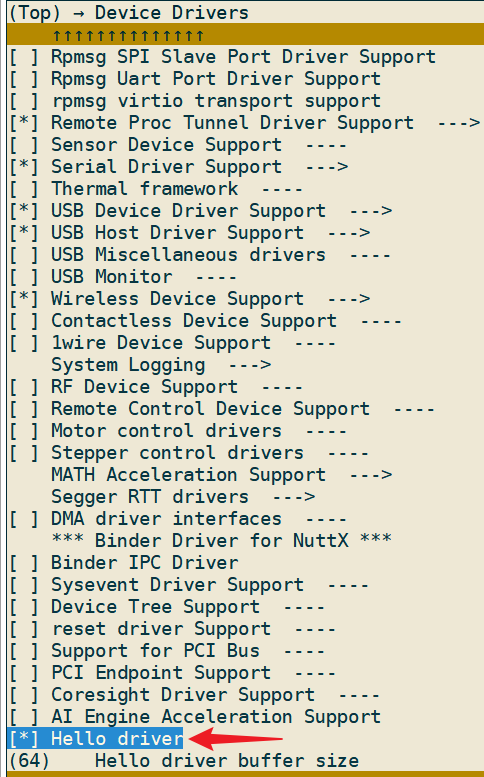
编译烧写新映像文件后如下操作:
nsh> ls /
……
hello
……
nsh> hello -d /hello -w abc
open file -d /hello -r
write driver: 4
nsh> hello -r
open file /dev/hello ok
read driver: 64
APP read : abc
应用程序和驱动交互的内部机制
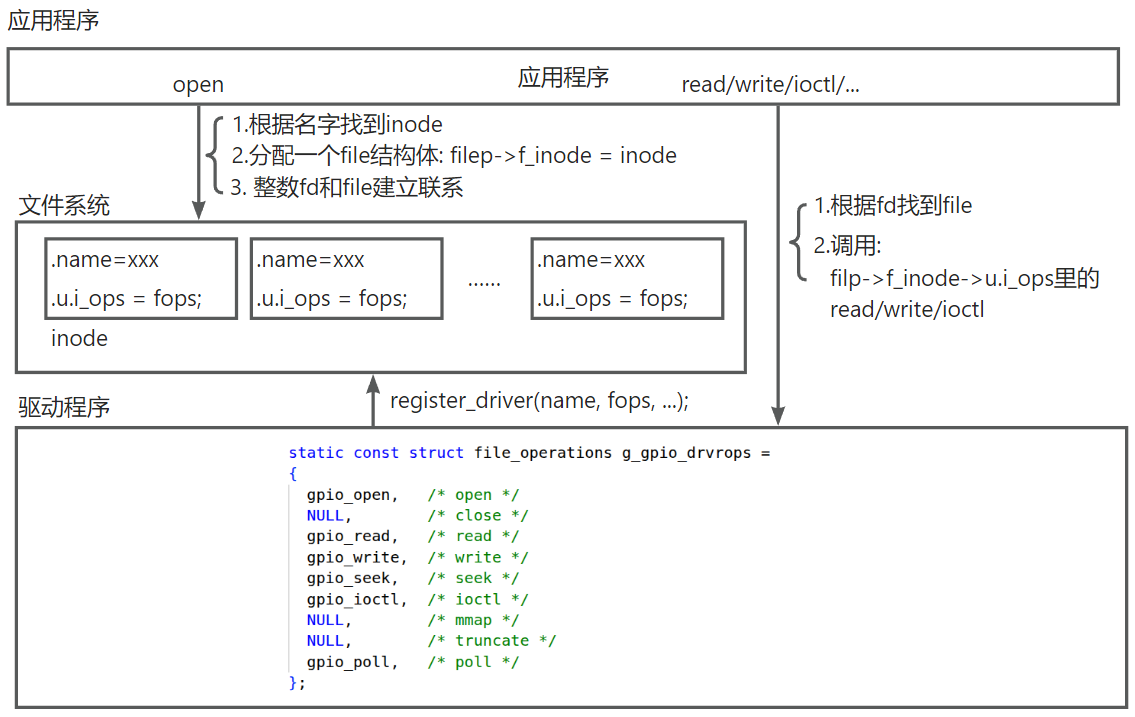
注册驱动程序时,会分配一个inode结构体,把“文件名”和“file_operations结构体”放在里面。然后把这个inode结构体记录在“g_root_inode”树里。
APP调用open函数时,会在open函数里根据文件名在“g_root_inode”树里找到对应的inode结构体,并且分配一个file结构体:在file结构体里记录inode,并在“进程组”里为file结构体分配一个独一的整数:fd。
以后APP调用read/write/ioctl等函数时,都传入整数fd:内核文件系统根据fd找到file结构体,从里面得到indoe结构体,进而得到file_operations结构体”,然后调用“file_operations结构体”的read/write/ioctl等函数指针。
如下图所示:
驱动子系统(驱动分层)的作用
驱动子系统的引入
openvela里定义了驱动程序框架,使得APP访问硬件时可以使用统一的接口:open/read/write/ioctl等。
但是,还不够:除了接口函数统一之外,对于某类驱动,还想把这些接口函数的参数类型也统一起来。
仿照hello驱动,想实现如下功能:
-
创建“/dev/sam”对应的驱动:APP调用write函数传入“xxx”,再调用read函数时得到的是“sam say: xxx”
-
创建“/dev/bill”对应的驱动:APP调用write函数传入“xxx”,再调用read函数时得到的是“bill say: xxx”
你可以实现两个驱动:
-
drv_sam.c,在它的read函数里返回“sam say: ...”
-
drv_bill.c,在它的read函数里返回“bill say: ...”
-
这2个驱动程序没有任何关系
怎么规定驱动程序drv_sam.c、drv_bill.c返回的数据带有“Sam say:”后“Bill say:”前缀?可以编写文档来约束驱动开发人员:你必须按照文档来实现驱动。但是也许驱动开发人员根本没看到这个文档。
openvela的做法是引入“xxx驱动子系统”,比如“hello驱动子系统”。
在“hello_drv_frame.c”里实现如下函数:
struct hello_dev_s

{

char buf\[100\];

int offset;

};

// 1. file_operations

static ssize_t hello_read(FAR struct file \*filep, FAR char \*buffer,

size_t buflen)

{

struct hello_dev_s \*dev = filep-\>f_inode-\>i_private;

int len = buflen \> sizeof(dev-\>buf) ? sizeof(dev-\>buf) : buflen;

memcpy(buffer, dev-\>buf, len);

return len;

}

static ssize_t hello_write(FAR struct file \*filep, FAR const char \*buffer,

size_t buflen)

{

struct hello_dev_s \*dev = filep-\>f_inode-\>i_private;

int len = buflen \> (sizeof(dev-\>buf) - dev-\>offset) ? (sizeof(dev-\>buf) - dev-\>offset) : buflen;

memcpy(dev-\>buf + dev-\>offset, buffer, len);

return len;

}

static const struct file_operations g_hello_drvrops =

{
NULL, /* open */
NULL, /* close */
hello_read, /* read */
hello_write, /* write */
NULL, /* seek */
NULL, /* ioctl */
NULL, /* mmap */
NULL, /* truncate */
NULL, /* poll */
};

// 2. register_driver

int hello_dev_register(const char \*name)

{

char path\[32\];

struct hello_dev_s \*dev = malloc(sizeof(struct hello_dev_s));

sprintf(dev-\>buf, "%s say: ", name);

dev-\>offset = strlen(dev-\>buf);

sprintf(path, "/dev/%s", name);

return register_driver(path, &g_hello_drvrops, 0666, dev);

}
然后再去编写drv_sam.c驱动程序,它调用:
int sam_init()

{

return hello_dev_register(“sam”);

}
可以看到,drv_sam.c里不再直接调用“register_driver”,而是调用“hello_dev_register”:使用的是“hello驱动子系统”提供的“file_operations结构体”,它自然就遵守了这个子系统的约束。
各类子系统就是基于这样的原理:子系统里帮你实现了各种“file_operations结构体”,甚至其他共性的代码都帮你实现了,你只需要实现硬件相关的、独特的代码。
使用驱动子系统的软件层次如下:
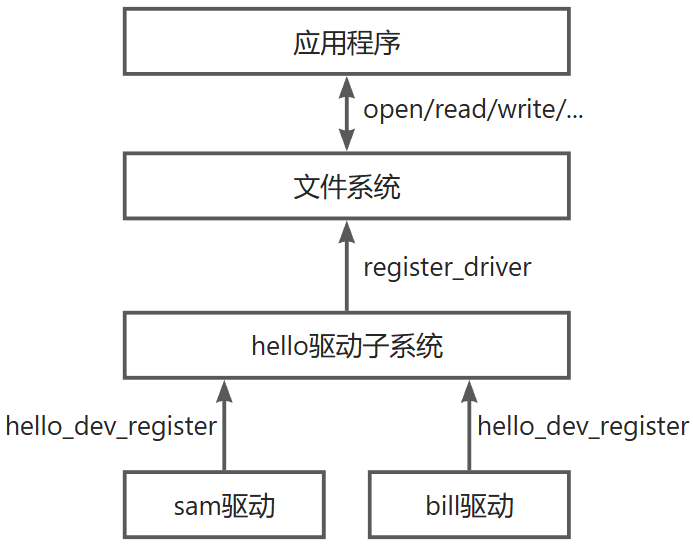
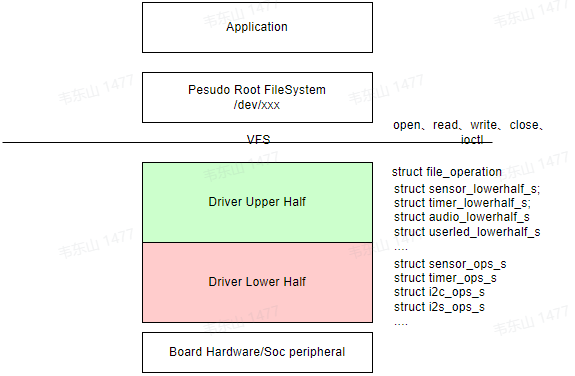
在openvela里,这样编写的驱动程序也被称为“Driver Upper Half”、“Driver Lower Half”,如下图所示: